
Guess you already know but with Move you can migrate VMs between environments with minimal downtime.
The below picture explains the Move architecture.
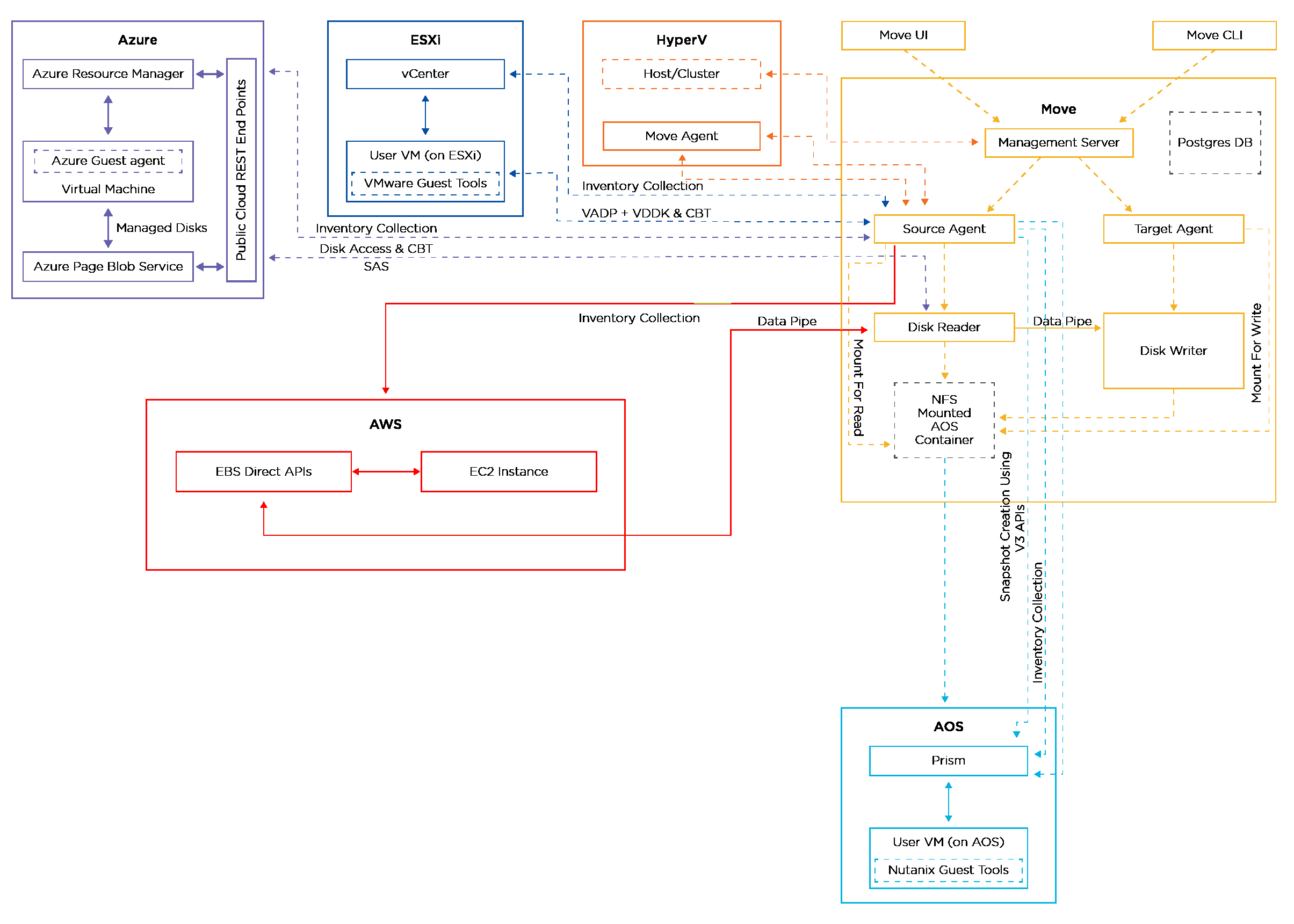
Picture borrowed from Nutanix official web site – The Move User Guide.
With Move 6.1 it’s now supported to perform an in-place cluster conversion from ESXi to AHV. In addition to this new capability the following new guest operating systems with the defied source and target locations are now supported:
- ESXi to AHV: RHEL 9.5 (BIOS, Secure Boot), OEL 8.1, 8.5 (BIOS), CentOS Stream 8, 8.1 (Secure Boot)
- Azure to AHV: Ubuntu 22.0.4 (Gen1, Gen2)
- AHV to AHV: RHEL 9.5 (BIOS, Secure Boot), OEL 8.1, 8.5 (BIOS)
The following migration types are supported with Nutanix Move:
- Nutanix AHV to:
- Nutanix AHV
- AWS EC2
- Microsoft Azure Cloud
- NC2 on AWS/Azure
- NC2 on AWS to Nutanix AHV
- VMware:
- ESXi (legacy infrastructure or Nutanix) to AHV
- ESXi (legacy infrastructure or Nutanix) to VMware ESXi on Nutanix
- ESXi to Nutanix Cloud Clusters (NC2) on AWS
- ESXi to NC2 on Microsoft Azure
- Cloud (VMC) on AWS to AHV
- Cloud (VMC) on AWS to NC2 on AWS
- Cloud (VMC) to ESXi on Nutanix
- Azure VMware Solution (AVS) to AHV
- Azure VMware Solution (AVS) to NC2 on Azure
- AWS EC2 to
- AHV
- VMware ESXi on Nutanix
- NC2 on AWS
- Microsoft
- Hyper-V to AHV
- Hyper-V to VMware ESXi on Nutanix
- Hyper-V to NC2 on AWS
- Hyper-V to NC2 on Azure
- Azure Cloud to AHV
- Azure Cloud to VMware ESXi on Nutanix
- Azure Cloud to NC2 on Azure
You can upgrade to Move 6.0.1 from the following previous Move versions 5.6.0, 6.0.0, and 6.0.1.
Useful Links
Njoy the new Move version..